By

We Want Your Feedback!

We would love to hear feedback from you concerning FitPro, our first commercial theme. What are your favourite features, what would you like to see us add next? You tell us! We have put together a special form to leave feedback just about our themes.

Please fill out the feedback form here.

If you haven’t already taken FitPro for a spin then you can view the live demo here.

We want to hear your thoughts about the theme, what features really stood out for you, how do you think we could improve it to make it even better? Perhaps you loved the theme demo, but thought the theme information was too technical for you? Could you find all the details you were looking for, and was everything clear etc?

Any comments would be most appreciated and will help us to develop FitPro further and add all the whizzy new features we know you want to see!

Thanks for supporting us.. :-)

By

Still No jQuery Accordion in WordPress 3.1?

Update: Just posted a ticket to core trac. Response was that new JavaScript libraries tend to only get included if they are used in WordPress core, which explains why it isn’t added (yet). I think that it should be considered though because of its usefulness, and tiny file size!

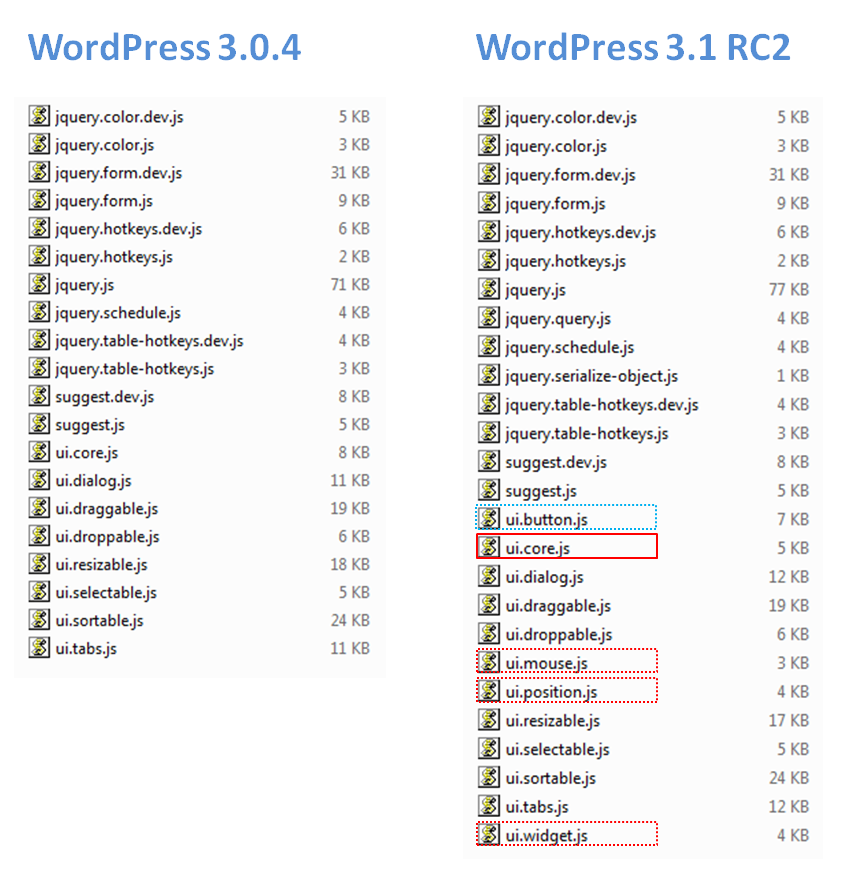
There seems to be a bit of a shake up in the jQuery UI files included with WordPress 3.1. Firstly there is a new UI version (1.8.7), rather than 1.7.3 which was included in WordPress 3.0.4.

Also, the jQuery core files have been broken out of the single ui.core.js file into four separate files: ui.core.js, ui.mouse.js, ui.position.js, ui.widget.js. This makes it a little clearer what core UI components are included with WordPress. You can see this more clearly in the screen shot below. The core files are outlined in red.
There are two new UI widgets available in jQuery, and one of these, the button widget, has made it into WordPress 3.1. The autocomplete didn’t make it in. This is not a surprise as this might not be required that much at the moment, but users may need this as more autocomplete examples pop-up around the web.

I am a little disappointed though at the lack of inclusion of the accordion widget which has been around for a while now, and is a very useful addition to your web pages. There may be a good reason for this, that I am not aware of, but at just 9 KB it is very small and could be included without anyone hardly even noticing!

I use a lot of jQuery accordions for theme/Plugin options pages and find it a hassle to have to add in the accordion widget manually. It is not really a big issue, but it’s conspicuous by its absence. Anyone else know why it is not shipped along with the other WordPress jQuery files? Let me know in the comments if you do.

Oh, and the datepicker widget would be nice too. However this is around 35 KB so might be seriously considered for now. Anyway, just imagine being able to pick the date from the nice jQuery datepicker rather than have to manually enter the date/time as you do now. 😉

By

Find the Admin URL in WordPress 3.0

The other day I was looking for a way to get the URL to the installed WordPress admin folder. I was almost certain that I would have to ‘construct’ this URL manually. This wasn’t a problem I had done similar tasks many times before.

But to my pleasant surprise I found a nifty little function called get_admin_url(), which I didn’t know existed. This is probably as it is a new addition to WordPress 3.0. The function can be found in the /wp-includes/link-template.php file at line number 1950. You can see the full source code here.

Looking at the core code it is obvious that this function was written with a more general purpose in mind. In fact it returns the WordPress admin URL of multi-site blog with a specific ID. If you don’t specify a particular ID then it returns the current blog admin URL.

Interestingly, there is another closely related function called admin_url() which returns the admin URL of the current blog only. The difference between the two is that you can’t specify a blog ID with this function.

If you only need to get the admin URL of the current blog (as I did) then you can use either function with no parameters, and they will both return exactly the same result. It’s just a matter of preference.

Looking through the /wp-includes/link-template.php file I noticed that there were a few other new functions added to WorPress 3.0 for returning WordPress links.

Here is a quick summary (including links to the source code) of all the new link related functions in link-template.php:

By

Minimise Admin Bar Plugin

Now available to download from the repository.

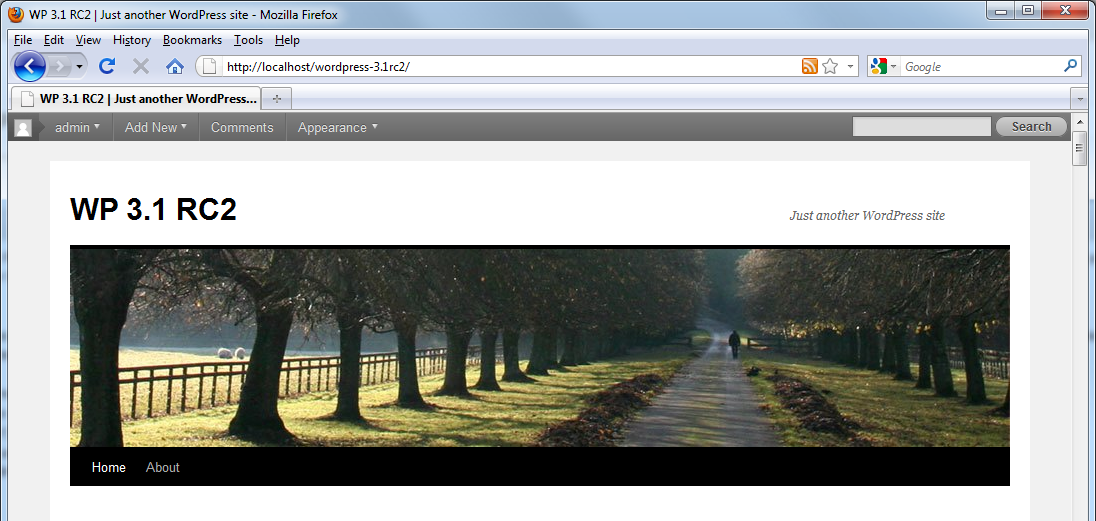
OK, it’s been a while since our last Plugin release, so we are pleased to announce a brand new one hot off the press! What does this one do? Well, if you have used a beta version of WordPress 3.1 you will know that on the front end of your blog pages you now have displayed, by default, an admin bar. A screen shot of this is shown below.

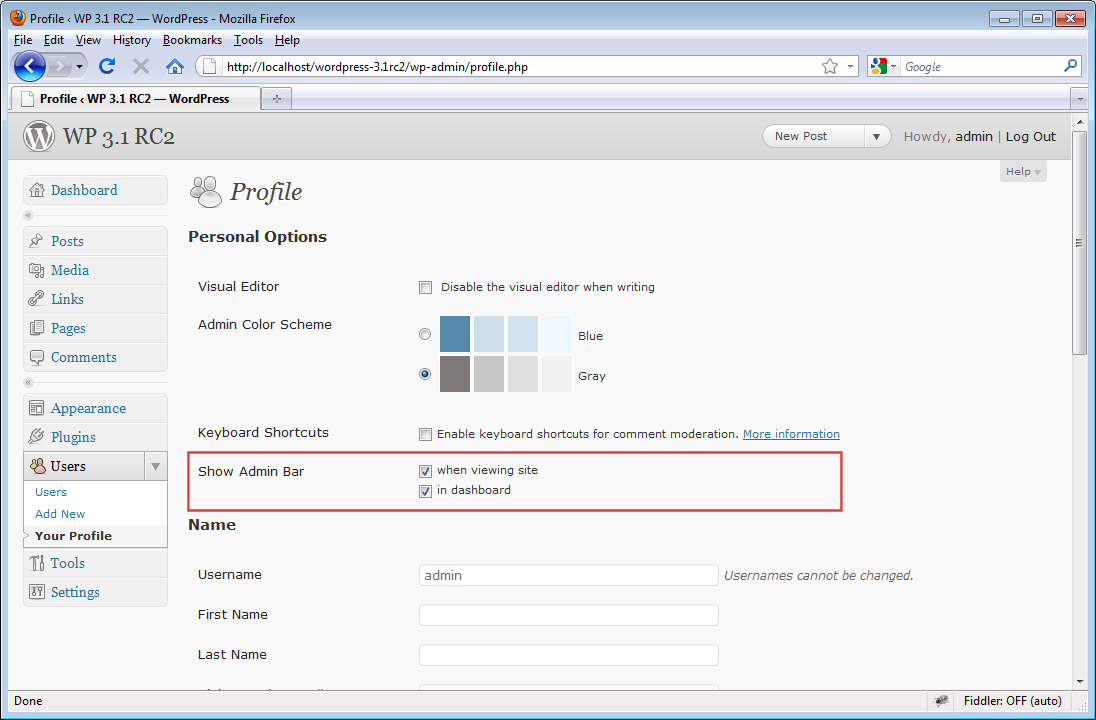
The admin bar gives you a menu full of quick links to your WordPress admin panel. A lot of users don’t seem to like the admin panel displayed at the top of every page, and so seek ways to disable it or remove it. You can easily disable it on a per user basis via a users profile page, as shown below.

However this is not that useful if you want to remove it site-wide. The Admin Bar Minimiser Plugin was written to help users keep the admin bar active but be able to minimise it at any time to make it less obtrusive. You can see a demo of the Plugin in action in the following video:

As you can see, the Plugin works by allowing you to minimise the admin bar from view via a single click. You can bring it back just as easily. This also works for the admin bar displayed on the WordPress back end too.

Don’t forget though, to be able to minimise the admin bar on the WordPress back end too, you will need to enable it for the currently logged in user. This is because the admin bar is not enabled by default for WordPress admin pages. However it is for front end pages.

The Plugin will be live in the WordPress repository soon, we are just waiting for the Admin Bar Minimiser SVN repository to go live.

Since the demo video above was recorded I have added an options page for the Plugin. This allows you to set whether the front end, and back end shows the admin bar maximised by default. I would love to hear what you think about the Plugin, and how useful you think it is going to be to you once WordPress 3.1 is here.

By

New WordPress Theme FitPro

FitPro WordPress Theme

For the last few months we’ve been busy developing our first commercial WordPress theme, FitPro. It was designed from the outset to be the ultimate website solution for fitness professionals, but at a fraction of the cost you’d normally expert to pay for such a website.

FitPro is much more than just another WordPress theme. It is basically an online business in a box for fitness professionals. It is a custom website solution with advanced functionality built-in that can be easily moulded to suit your needs. FitPro can be installed in just a couple of clicks, and quickly configured to give you a beautiful website in no time at all. And all for less than $250!

Click here to read more details about the full range of features available in FitPro, and why you should be using it on your site TODAY!

By

New Arrival at PressCoders.com!

Scott BolingerI’m super excited to announce the arrival of Scott Bolinger at PressCoders.com. Scott is a well known and very respected graphics designer, and he’s joined PressCoders full-time as co-lead theme developer. With Scott’s top notch web design and graphics talent you can expect to see some great new theme designs over the coming year.

In fact, our debut theme FitPro is designed from the ground up by Scott and myself and gives you a clear example of his ace design talents (and my coding expertise!).

Scott has many years experience in the website and graphics design industry. He has developed numerous bespoke web design solutions for major companies and individuals alike. Similar to myself, Scott understands that WordPress is an extremely powerful and flexible website platform and he has joined PressCoders.com to help us develop the next generation of WordPress themes!

Welcome aboard Scott!

By

jQuery UI Widgets on Blog Pages

A little while ago I covered some important aspects of using the jQuery UI library inside of WordPress admin pages in the post entitled: jQuery UI in WordPress 3 Admin Pages.

This time, however, we will be focussing on how to add jQuery UI widgets into your WordPress posts/pages in a reusable way. All this will be wrapped up an a Plugin for portability. The Plugin will be uploaded to the WordPress.org Plugin repository and should be live soon, so you will be able to download it and use it on your own WordPress sites. Read More

By

jQuery UI in WordPress 3 Admin Pages

This article covers getting jQuery, and in particular jQuery UI up and running inside the WordPress admin. At the time of writing the latest version of WordPress is version 3.01 and that is the version we shall be using. Also, WordPress is running locally (using WAMP Server 2.0) with the default Twenty Ten theme (1.1).

Originally, I wanted to use jQuery UI on a Plugin admin options page. However my initial attempts were unsuccessful so I thought that I would document, and share, my experiences. There isn’t a huge amount of WordPress specific jQuery UI resources around (although there are numerous basic jQuery tutorials around), so hopefully the information presented here will help others overcome the initial hurdles. Read More

By

Draggable Blog Sidebar Widgets!

After playing around with some jQuery sorting demo’s I wanted to be able to implement these easily into WordPress.

The steps needed to complete this are:

  • Register jQuery, and jQuery UI libraries with WordPress.
  • Enqueue the scripts to load them on blog pages ONLY.
  • Set-up a shortcode to render jQuery code.
  • Add jQuery code to shortcode callback function.
  • Add the shortcode to any post/page to see it working!

Read More

By

Close-up: wp_head Action Hook

I recently needed to add some code just before the closing header tag on my theme pages, via a WordPress Plugin.

Of course, I made use of the wp_head action hook which is perfect for this task. However, my requirement was a little more specific than this. What I actually needed was to make sure the code was guaranteed to be the LAST code added right before the closing head tag. Read More